
Support for Windows 10 ended on October 14, 2025. Here you’ll find what the end of Windows 10 support means, what the ESU program requires, and what options you have. If you need a license for Windows 11, see Windows 11 Pro, digital license ESD or Windows 11 Home, digital license ESD.
What the end of Windows 10 support means
Your Windows 10 PC still starts and works as before. However, Microsoft no longer provides software updates, security fixes or technical assistance. Without updates, your PC becomes more vulnerable to viruses and malware. An antivirus, such as Microsoft Defender, helps, but Microsoft says it is not enough on its own.
Windows 10, version 22H2, is the last version of Windows 10.
The ESU program for consumers
ESU (Extended Security Updates) is the program that lets a Windows 10 PC keep receiving security updates.
Until when? Until October 12, 2027. The program was extended by one year. Microsoft announced the extension in a note dated June 25, 2026, on the Windows Experience blog. October 13, 2026 (the end of the first year) still appears in Microsoft’s lifecycle table for Windows 10, but that table covers the commercial program. For personal use, the current Microsoft pages give October 12, 2027.
Conditions in Romania (a country in the European Economic Area, where Microsoft has two options):
- Free, if you sign in with a Microsoft account and stay signed in with the same account on the PC. If you stop signing in, updates stop after 60 days at most.
- One-time payment, in local currency, if you use a local account. You see the amount in the enrollment flow in Windows Update.
Common requirements:
- Windows 10, version 22H2, Home, Professional, Pro Education or Pro for Workstations edition.
- The latest updates installed, including the licensing preparation package KB5126256.
- An administrator account. The Microsoft account cannot be a child account.
- The PC is not in kiosk mode, is not joined to an Active Directory or Microsoft Entra domain, and is not managed through MDM.
- One ESU license covers up to 10 devices. Each PC must be enrolled separately.
How to enroll:
- Go to Settings → Update & Security → Windows Update.
- If the PC is eligible, the Enroll now link appears. Select it and follow the steps.
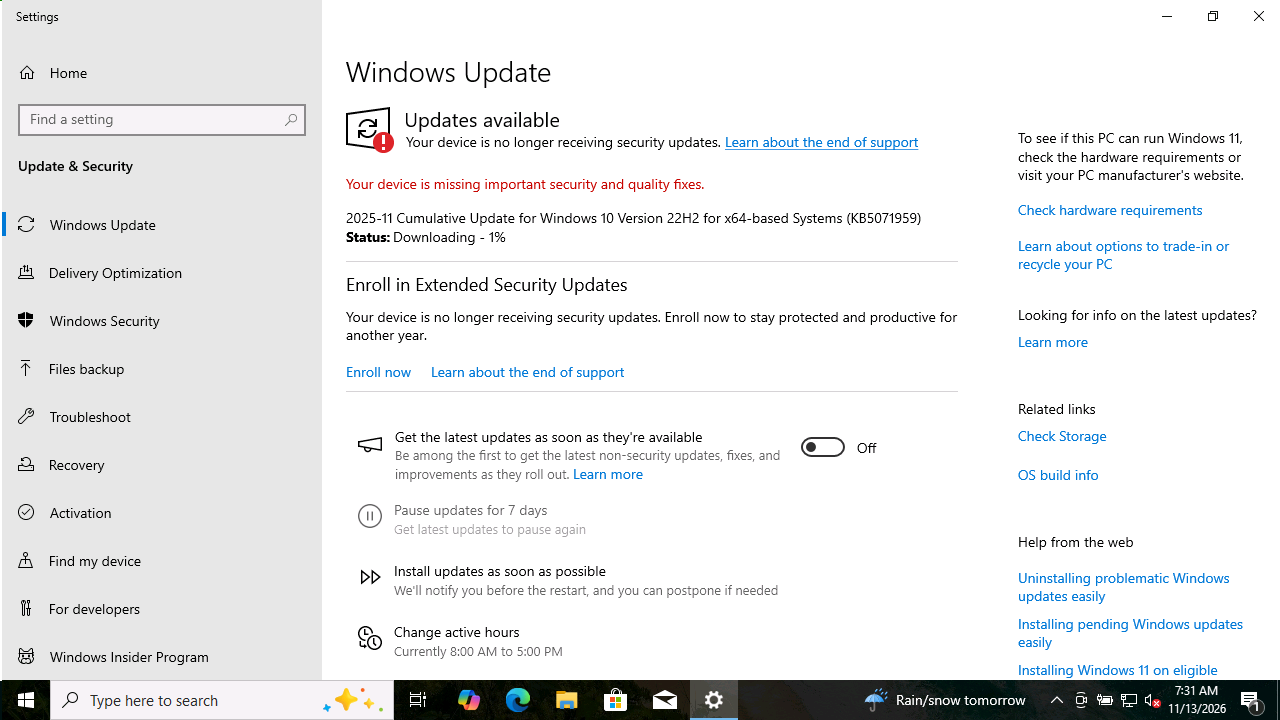
ESU includes only critical and important security updates. It does not include new features, other fixes or technical assistance. You can enroll at any time until October 12, 2027, but coverage ends on that same date, no matter when you enrolled.
Warning: ESU is a temporary solution, not a Windows license. After October 12, 2027, your PC is left without updates. If you enroll late, you stay more vulnerable until then.
What options you have
- Move to Windows 11. Moving from Windows 10 Home or Pro to the equivalent Windows 11 edition is free, if your PC meets the minimum requirements. See the article Upgrade from Windows 10 to Windows 11 without losing your files. For a clean installation, see installing Windows 11 Home and Pro, step by step.
- Stay on Windows 10 with ESU, if your PC cannot move to Windows 11 or you need more time. Enrolling does not stop you from upgrading to Windows 11 later.
- Buy a new PC with Windows 11, if your current hardware is not compatible. If you are thinking of replacing components to meet the requirements, Microsoft recommends checking first with the PC manufacturer or a hardware specialist.
- Go without updates. Microsoft does not recommend this option.
You can check whether your PC can move to Windows 11 with the PC Health Check app or from Windows Update. The checking steps are in the article Windows 11 compatibility: TPM 2.0 and Secure Boot. The minimum requirements are on the Microsoft Windows 11 specifications page.
Office apps on Windows 10
Office still starts on Windows 10. However, Microsoft states that problems caused by the unsupported operating system are not covered by Office support. Office 2019 no longer receives support on any operating system. Windows 11 is the recommended platform.
Buying a license?
For a PC with Windows 11, you can find these in the shop:
- Windows 11 Pro, digital license ESD
- Windows 11 Home, digital license ESD
- Windows 11 Pro, BOX with USB stick
- Windows 11 Home, BOX with USB stick
See also all digital Windows licenses.
Frequently asked questions
What happens to Windows 10 after October 14, 2025?
Your PC starts and works as before, but Microsoft no longer provides security updates and technical assistance. Without updates, your PC becomes more vulnerable to viruses and malware.
What is the ESU program for Windows 10?
ESU (Extended Security Updates) is the program that lets a Windows 10 PC keep receiving security updates, until October 12, 2027. It includes only critical and important security updates.
Is ESU for Windows 10 free in Romania?
Yes, if you sign in with a Microsoft account and stay signed in with the same account on the PC. If you use a local account, Microsoft indicates a one-time payment.
Can I move from Windows 10 to Windows 11 for free?
Yes, moving from Windows 10 Home or Pro to the equivalent Windows 11 edition is free, if your PC meets the minimum requirements. Enrolling in ESU does not stop you from upgrading to Windows 11 later.
Need help?
Write to us at contact@conio-software.ro or on WhatsApp: 0799 237 426.