
Does Windows show you an error code during activation? Below are the most common Windows activation errors, as documented by Microsoft for Windows 11 and Windows 10, with what each one means and the recommended steps. The installed edition must match the key. Windows licenses in the shop: Windows 11 Pro, digital license ESD and Windows 10 Pro, digital license ESD.
Warning
- Write down the exact code and take a screenshot before you try anything.
- Resetting the device (Reset this PC) can delete files. Make a backup first.
- The installed edition must match the key. You can check it in Settings > System > About.
- Windows 10 no longer receives free security updates as of October 14, 2025. The codes below apply to it too.
Start with these steps
- Check the status in Settings > System > Activation (Windows 10: Settings > Update & Security > Activation). More about status and edition: how to check whether Windows is activated.
- If Windows is not activated, the Activation state row shows Not active, and below it you see a red message with the error code and the Troubleshoot button. Run it. After an installation without a key, Windows 11 shows, for example, “Windows reported that no product key was found on your device. Error code: 0xC004F213”.
- Check your internet connection, the date, and the time.
- Look up the code in the table below.
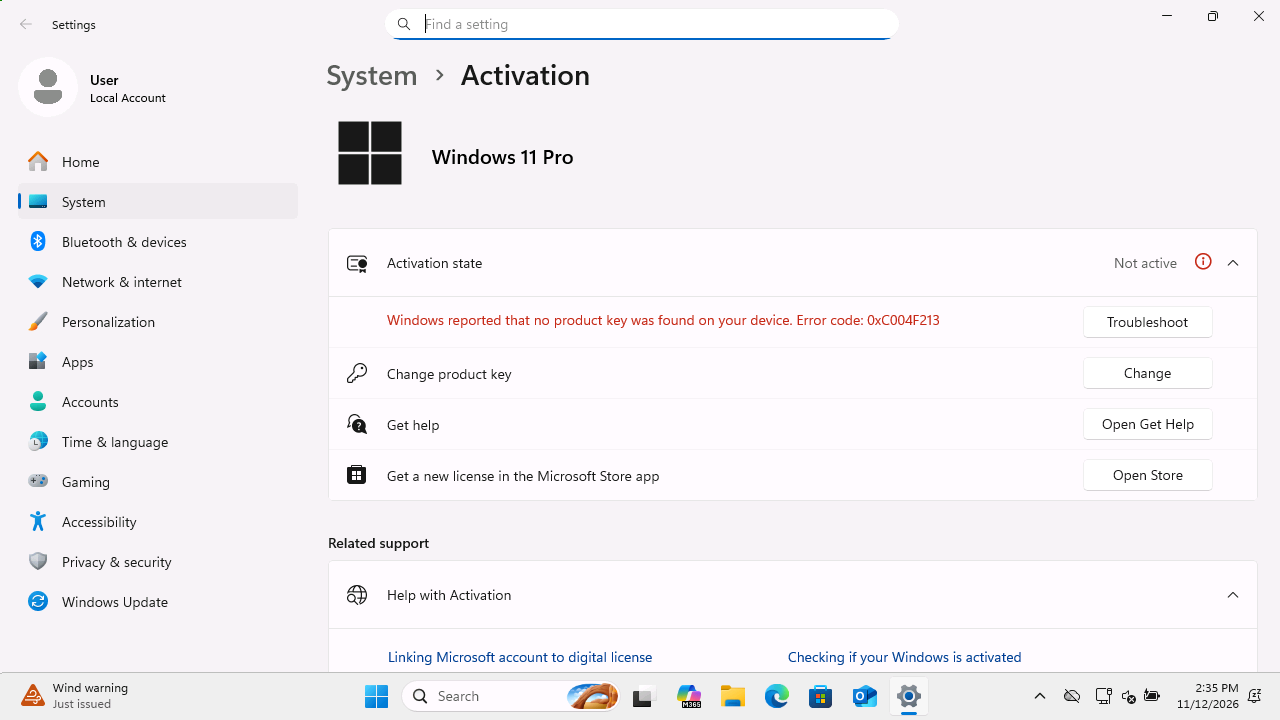
Windows activation errors: codes and solutions
| Code | What it means | What to do |
|---|---|---|
| 0xC004F211, 0xC004F213 | Windows can’t find the license after a hardware change, or there is no key. | You can try Troubleshoot with the same Microsoft account you used before the change, or the key you used previously. |
| 0xC004F050 (and other codes in the same group, for example 0xC004C060, 0xC004C001) | The key you entered can’t activate Windows. | Check every character. If you pasted the key, the dashes must be plain hyphens. If the servers were busy, wait and select Activate again. If the error remains, write to us. |
| 0xC004C003 | The key is not considered valid. | Run Troubleshoot and check that you have the key on paper or in your email. If you bought it from us, write to us. |
| 0xC004F034 | Invalid key, or a key for a different version of Windows. | Enter a key that matches the installed version and edition. |
| 0xC004F210, 0xC004F212, 0xC004E016 | The key is for a different edition than the one installed (for example Home versus Pro). | Enter a matching key, or reinstall the edition covered by the license. Troubleshoot can help you install the correct edition. |
| 0xC004F00F | A key for the Enterprise edition, entered on Home or Pro. | Enter a key that matches the installed edition. |
| 0xC004F074, 0x8007007B, 0x8007232B, 0xC004F038 | An Enterprise key on Home or Pro, or a work device that is not connected to the company network. | Enter the matching key again at Change product key (the Change button). On a work device, contact the support person in your organization. |
| 0x803F7001, 0x800704CF | Windows didn’t find a valid license (first installation, changed hardware, or the wrong edition reinstalled). | Enter the 25-character key at Change product key (the Change button). After a hardware change, you can try Troubleshoot. |
| 0xC004C008, 0xC004C770, 0x803FA071 | The key was used on another device, or on more devices than the license terms allow. | Each device needs its own key. After a major hardware change, you can try offline activation (see below). |
| 0xC004FC03 | No internet, or a firewall is blocking activation. | Check the connection and the firewall. If that doesn’t work, use offline activation. |
| 0x8007267C | No internet, or the activation service is unavailable. | Check the connection and the firewall. |
| 0x80072F8F | The date or time is wrong, or Windows can’t connect to the activation service. | Check the date and time, run the network troubleshooter, then restart. |
| 0xC004E028 | The computer is already being activated. | Wait for the first attempt to finish. |
| 0xD0000272, 0xC0000272, 0xC004C012, 0xC004C013, 0xC004C014 | The activation service is temporarily unavailable. | You don’t need to do anything. Windows activates on its own when the service is back. |
| 0xC004E003 | A third-party program changed system files. | Restore the system to an earlier restore point. |
| 0x80004005 | General activation error. | Run Troubleshoot. If that doesn’t help, reset the device. |
| 0x87E10BC6 | Error on the activation or licensing server. | Wait a few minutes, run Troubleshoot, then try again in the Microsoft Store. |
| 0x80070652 | Windows Update components are missing or damaged, or the connection is weak. | Run the Windows Update troubleshooter and check the connection. |
The code in Settings and the Notification Reason from slmgr /dli can differ: on a copy of Windows installed without a key, Settings showed 0xC004F213, while slmgr /dli showed 0xC004F034. Look up both codes in the table. On a copy of Windows installed without a key, both codes simply mean you haven’t entered the key yet: enter it on the Change product key row (the Change button).
If you replaced a part, see what you can try if Windows is no longer activated after a hardware change. If the error says the key doesn’t match the edition, see upgrading from Windows Home to Pro. For problems during installation, see problems installing Windows.
Windows offline activation
If Windows shows you a phone number, don’t call it. Microsoft points to the Product Activation Portal, aka.ms/WindowsActivate.
- Open Command Prompt as administrator and type
slmgr /dti. Write down the Installation ID. - On the portal, pass the captcha, sign in, choose Windows and your version, then enter the ID. You receive the Confirmation ID.
- Type
slmgr /atp <confirmation ID>, without the < > signs, hyphens, or spaces. - Check with
slmgr /dli.
Want to buy a license?
Windows licenses in the shop, for the edition that matches your key:
- Windows 11 Pro, digital license ESD
- Windows 11 Pro, BOX with USB stick
- Windows 10 Pro, digital license ESD
- Windows 10 Pro, BOX with USB stick
See also all digital Windows licenses.
Frequently asked questions
What does error 0xC004F050 mean when activating Windows?
The key you entered can’t activate Windows. Check every character; if you pasted the key, the dashes must be plain hyphens. If the error remains, write to us.
What do I do if I get error 0x803F7001?
Windows didn’t find a valid license (on first installation, after a hardware change, or on a wrongly reinstalled edition). Enter the 25-character key at Change product key (the Change button); after a hardware change you can try Troubleshoot.
What do errors 0xC004F210 or 0xC004F212 mean?
The key is for a different edition than the one installed, for example Home versus Pro. Enter a matching key, or reinstall the edition covered by the license.
How do I activate Windows if it doesn’t work online?
For 0xC004FC03, check the connection and the firewall; if that doesn’t work, use offline activation. If Windows shows you a phone number, don’t call it: Microsoft points to the Product Activation Portal, aka.ms/WindowsActivate.
Need help?
If activation stops working, write to us at contact@conio-software.ro or on WhatsApp at 0799 237 426 (https://wa.me/40799237426) and we’ll help. Send the code and a screenshot.