
Windows motherboard change: what happens to activation? Microsoft states that a Windows digital license is tied to the hardware of the device. After you change a major part, such as the motherboard, Windows may show that it is no longer activated. For digital licenses, Microsoft describes an activation troubleshooter. This guide covers changing the motherboard and how it affects Windows activation. Windows licenses in the shop: Windows 11 Pro, digital license ESD and Windows 10 Pro, digital license ESD.
Warning
- The edition (Home or Pro) must be the same before and after the change.
- The troubleshooter appears only if Windows is not activated, and it works only with the Microsoft account linked to the digital license.
- A clean install erases your files, apps and settings. First make a backup before reinstalling Windows.
- Windows 10 stopped receiving free security updates on October 14, 2025.
If you reinstall Windows on the same computer
Linking your digital license to your Microsoft account helps Windows reactivate after a reinstall on the same computer.
- Before you reinstall, open Settings > System > Activation (Windows 10: Settings > Update & Security > Activation) and check whether Windows is activated (how to check activation and edition).
- Check which account you use at Settings > Accounts > Your info. An email address above the word “Administrator” means you use a Microsoft account; with a local account, “Local Account” appears above it.
- On the Activation page, read the status message. If the account is not linked to the license, click Add an account and sign in.
- Write down the edition shown (Home or Pro) and keep the key you received from us.
- During setup, connect to the internet and sign in to your Microsoft account. If the product key screen appears and you have a digital license linked to your account, choose I don’t have a product key and select the edition you have. If you use the key you received from us, you can also enter it after setup, at Settings > System > Activation, on the Change product key row, with the Change button.
Windows motherboard change: if you replaced a major part
Below are the steps Microsoft describes for digital licenses linked to a Microsoft account.
- Sign in to Windows as an administrator.
- Open Settings > System > Activation and click Troubleshoot. After a few seconds the Troubleshooting has completed screen appears, for example with the message “We weren’t able to activate Windows on this device.”
- Click the I changed hardware on this device recently link. On Windows 11 26H2 it is a link and the screen has no Next button; if your screen has the Next button, click it.
- A Microsoft account window opens (at first it may stay blank for a few seconds), with the “Email, phone, or Skype” field and the Next button. Sign in with the Microsoft account linked to the license.
- Select the device you are using from the list shown.
- Click Activate.
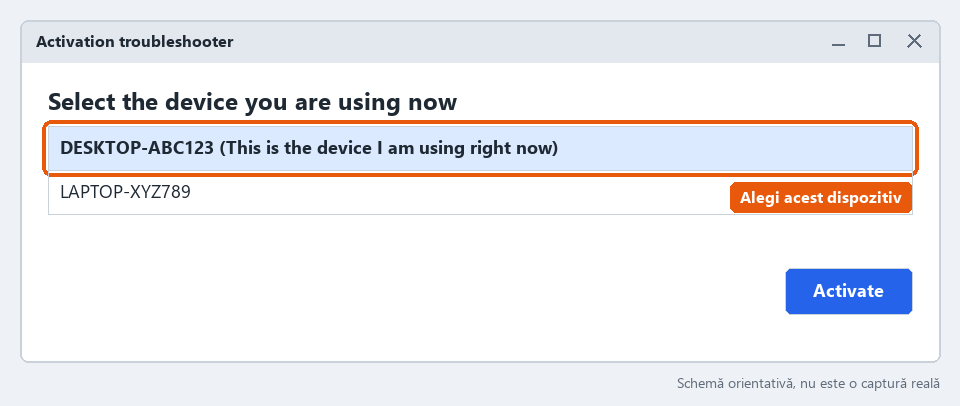
If the device does not appear in the list, check that you signed in with the same Microsoft account you used before the change. On Windows 10, the tool requires version 1607 or newer.
If you activated with a product key, Microsoft says to enter the same key after the change:
- Open Settings > System > Activation.
- On the Change product key row, click the Change button. The Enter a product key window opens.
- Enter the 25-character key in the Product key field and click Next.
Buying the license?
Windows licenses in the shop:
- Windows 11 Pro, digital license ESD
- Windows 11 Home, digital license ESD
- Windows 10 Pro, digital license ESD
- Windows 10 Home, digital license ESD
See also all digital Windows licenses.
Frequently asked questions
Windows is no longer activated after I changed the motherboard. What do I do?
For digital licenses, Microsoft describes a troubleshooter: at Settings → System → Activation, click Troubleshoot, then the “I changed hardware on this device recently” link, and sign in with the Microsoft account linked to the license. The tool appears only if Windows is not activated. If activation does not work, write to us.
Why is Windows no longer activated after I changed a part?
Microsoft states that a Windows digital license is tied to the hardware of the device. After you change a major part, such as the motherboard, Windows may show that it is no longer activated.
What do I do before I reinstall Windows on the same computer?
At Settings → System → Activation, check whether Windows is activated and which Microsoft account you use; if the message asks for it, click Add an account. Write down the edition (Home or Pro) and keep the key you received from us.
What do I do if I activated Windows with a product key?
Microsoft says to enter the same key after the change, at Settings → System → Activation, on the Change product key row, with the Change button.
If activation no longer works
Write down the error code and look it up in our article about Windows activation errors.
If activation no longer works after you change parts or the computer, write to us at contact@conio-software.ro or on WhatsApp at 0799 237 426 (https://wa.me/40799237426) and we will help you. Send the error code and a screenshot.